The Cockpit app
These pages describe the main branch. The latest published release is v0.6.0; features marked “In the next release” on the home page are not in it.
For daily use, crossweave Cockpit is an Electron thin client over
cwd, laid out like SpaceVibe Deck: one sidebar lists every open project and its
sessions, each row saying what is happening (working, waiting for you, failed, closed),
what the agent last said, how long ago and which agent runs — all inferred from the
session's shell, nothing to configure. It opens on its own (Dock, Spotlight) with a
welcome, or on a project with cw. A row's mark is quiet on purpose: nothing for a shell
with nothing running, a turning ring while an agent works, a ✓ when one finished and you
have not looked yet, amber when it asks you something. ⌘T asks which project, and whether to start a plain
Terminal or one of your launchers — Claude Code, Codex, Gemini CLI, OpenCode, Cursor
Agent, Copilot CLI, Aider, Amp, Qwen Code, or your own (cx); the ones not installed are
greyed out, and each launcher's command and environment are edited in Settings (⌘,). The
shell opens in the project folder — or in a worktree of its own, per session or as a
project's default — and the launcher's line is typed into it; ⌘D / ⌘⇧D split, ⌘W closes
a pane, ⌘1…⌘9 jump down the rail; tabs hold shells, files, web pages and the Changes
pane (the diff landing would bring in); a ready session carries a Land chip, and every
row shows its uncommitted files and commits to land. Right-click a project to rename it
(in the app only), color, reorder or close it, open it in Finder or your editor, start a
terminal in its folder, land everything ready, clean up ended sessions, or set its
defaults; right-click a session for the same folder actions and rename (or double-click
it). A filter box narrows the rail; the Dock counts sessions waiting for you.
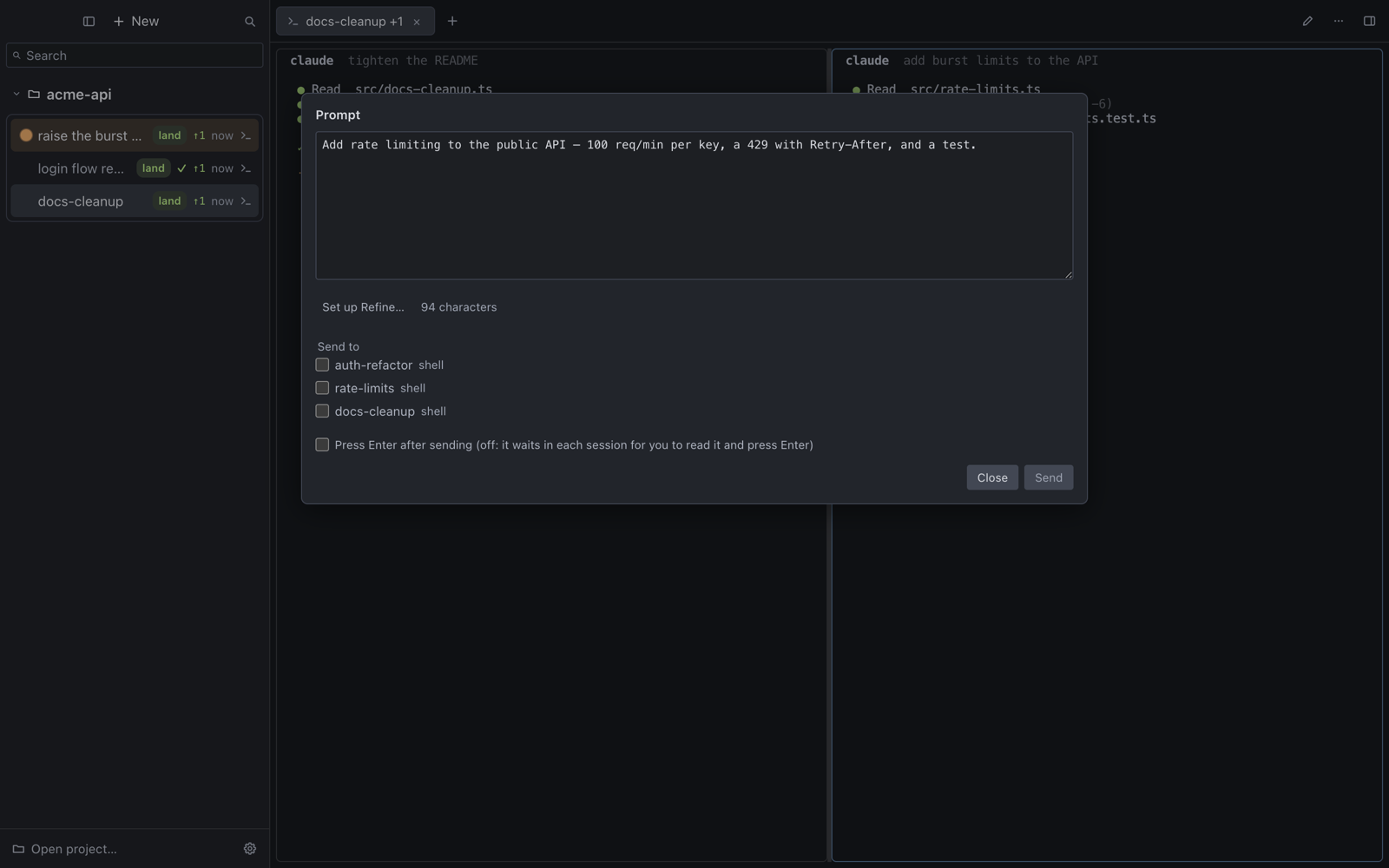
Also in the cockpit: a prompt composer (⌘⇧P) to write one prompt, optionally refine
it with a program you name (Settings → Prompt) and send it to one or several sessions;
Compare with another… (session menu) to put two sessions' changes side by side and land
the better one; presets (Settings → Presets, then ⌘T) that start a session, its dev
terminals and a browser on its port in one click; Run checks and a session history
(⌘⇧H); a per-session Debug pane (session menu → Debug: the failing tail, the error lines,
the browser panes' console errors and failed requests, the diff — with "Send to session", which
only drafts the text into the composer for you to confirm) and a Responses view (⌘⇧R) listing
the sessions your last prompt reached, each with its state, its agent's last words and its check;
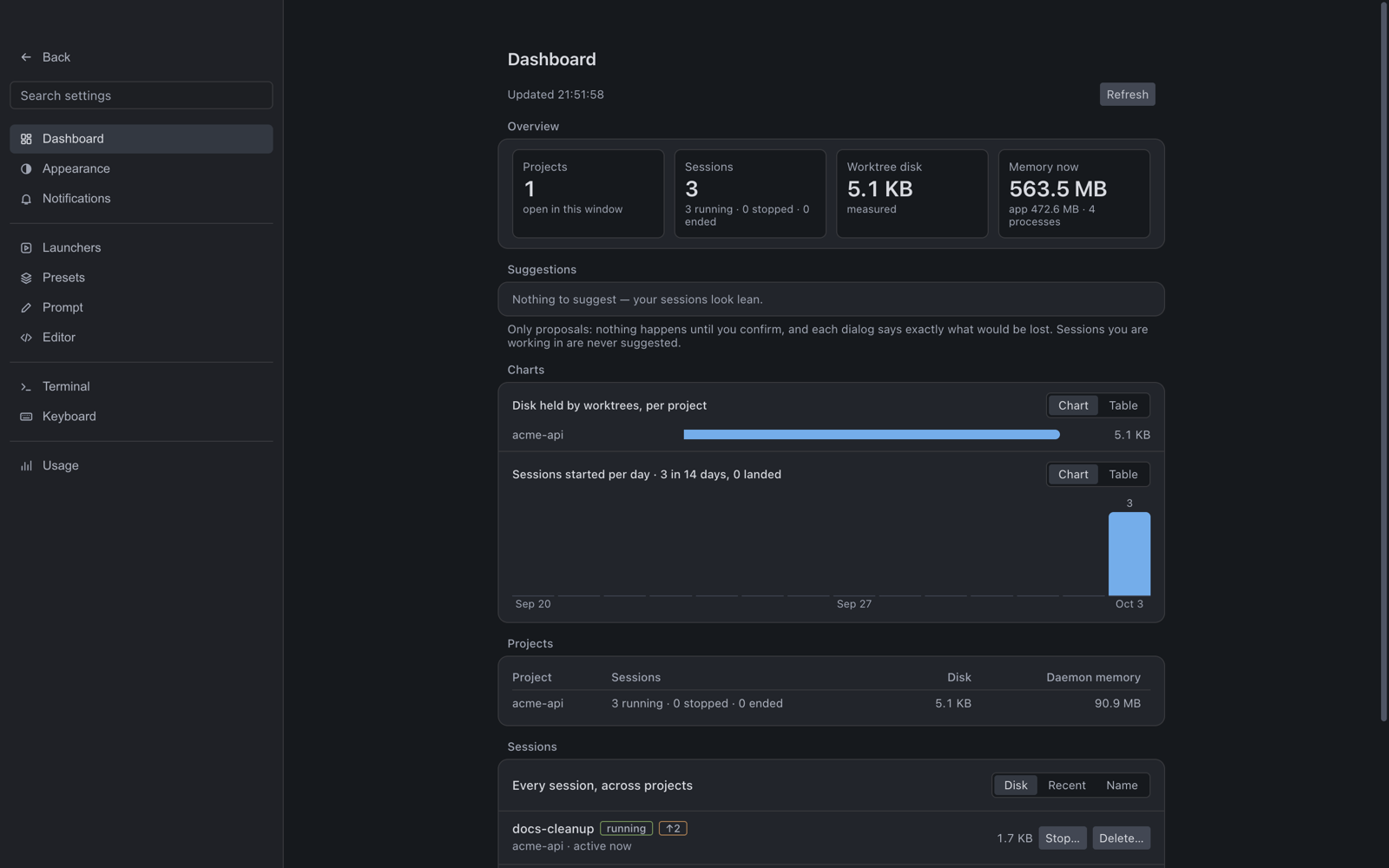
a Cursor-style Settings page with a Dashboard (projects, sessions, the disk their
worktrees hold, memory, and proposals to stop or delete what is idle — nothing happens until you confirm); tmux-style panes (Ctrl-A then a key, synchronize, copy-mode, optional terminal
persistence); and a per-pane Agent switch (Off / Read / Control) for cw browser.
Same daemon and evidence gate as the CLI; the app never spawns anything itself.
 On macOS arm64 the standard installer includes it when the selected release
carries the app asset, and bare
On macOS arm64 the standard installer includes it when the selected release
carries the app asset, and bare cw opens it
for the current repository. If the app is absent or cannot launch, cw
falls back to the TUI; cw tui always selects the terminal dashboard.
| v1 platform | macOS arm64 only (macOS-only-v1) |
| Windows / Linux cockpit | Deferred until cwd is portable on those OSes |
| Design | docs/superpowers/specs/2026-09-17-cockpit-design-system.md — one token layer (apps/cockpit/src/ui/tokens.ts) shared by the chrome and the panes |
| Dev | cd apps/cockpit && bun install && bun run dev |
| Package | cd apps/cockpit && bun run dist:mac — see apps/cockpit/README.md |
| Design | docs/superpowers/specs/2026-09-16-cockpit-electron-design.md |